
Risk threshold levels are configured by the Organization Administrator in Organization Settings > Extensions > Nooga Risk Settings.
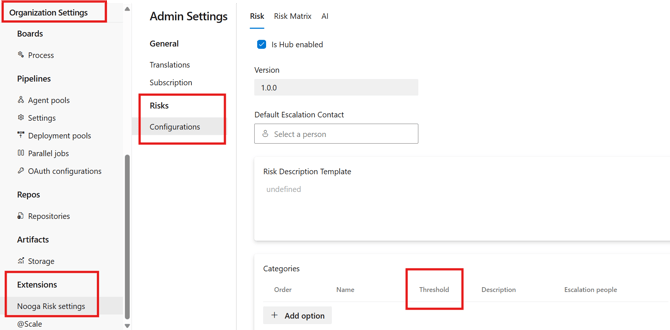
For each risk category, you can define a specific risk score that acts as the acceptance limit.

This way, one or more authorized approvers are required to formally approve any risk above the defined threshold that is to be accepted guaranteeing that decisions involving higher risks are properly escalated and assessed by the appropriate stakeholders prior to finalization.
Add assignees for escalation by clicking the tre dots and "Edit". Choose one or several people per category.
➡️If you need the complete instructions on getting started with Nooga Risk, check out our step-by-step guide to setting up Nooga Risk.