
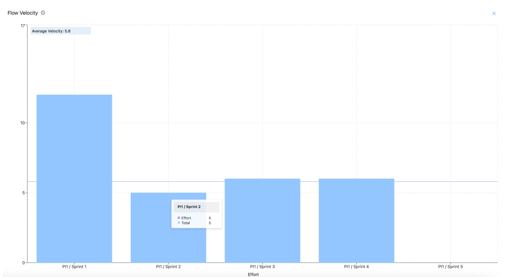
The Flow Velocity graph provides a visual summary of the total story points or effort delivered over a defined period. This enables teams to quickly identify patterns or slowdowns in delivery, supporting effective workflow optimization.
To retrieve Flow Velocity data, Nooga Scale queries the "WorkItems" entity type in the Azure DevOps analytics service. It specifically looks for work items that:
- Has a work item type in the list of selected work item types in the filter in the Scale analytics
- Has an area path that is subscribed to the team ids in the list of teams selected by the user
- Has an iteration that starts with the selected ARTs PI iteration paths (or team iterations if applicable)
- Has a state category of 'Completed'
- Has the fields Effort or Story Points on the work item form
One query is made per avaialble project ID in the list of distinct projects in the selected ART.
Mapping the data to the view
Only iterations with end dates prior to today are included in the graph. For each PI, all effort or story point values are aggregated by iteration and presented in a structured view.
Currently, Flow Velocity does not support ARTs that span multiple Azure DevOps projects. As a result, for ARTs including teams from different projects, the graph may display incomplete or inaccurate data if those teams are outside the project where Nooga Scale is operating.