
We are expanding our product offerings into Nooga so, while the extension stays the same, a new version is required for future updates.
Note: all of your settings and ongoing work will remain unchanged and no additional information will be required to complete the migration.
Instructions:
- for Project Collection Administrators and/or Subscription Owners -
- A blue banner will appear in-app at the top of the window ; click on the button "Start Migration" .
- A pop-up will appear, click on "Install" to get to the Azure Marketplace and install our new Nooga extension.
-
Open the new Nooga extension and you will be prompted to migrate your settings from @Scale by Solidify to Nooga Scale.
-
Follow the steps in the migration wizard, no input is needed.
Important notes:
- Complete the steps for each organization where the @Scale by Solidify extension is installed. Once the migration is completed for each organization, the Solidify extension will no longer be available for use.
- Please update your extension as soon a possible to avoid disruptions in the service.
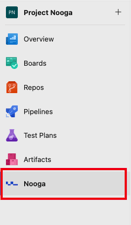
- The Nooga Scale icon has been relocated at the left-hand menu for easier access and will now appear with the Nooga symbol and the name ‘Nooga’ as a new hub (see image below).
If you're have an Enterprise subscription plan, for further assistance get in touch with your Customer Success Manager at Nooga Solutions.
Have questions? Check out our Migration FAQs.
Thank you in advance for your collaboration!