
Step 1 - Open Nooga
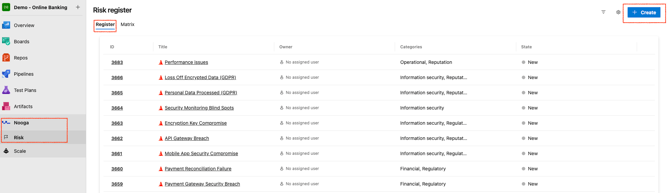
- Open the Nooga Risk extension in Azure DevOps.
- All existing risks for the project are listed in the Risk Register.
- To add a new risk, click the blue “+Create” button in the top right corner.
Step 2 - Fill in Risk Details
-
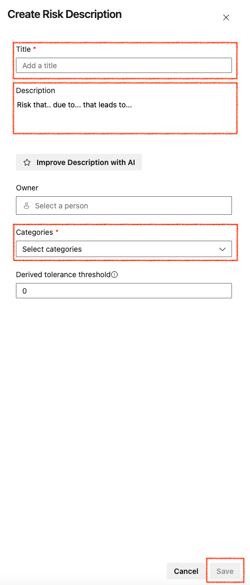
Title – Give the risk a clear, concise name.
-
Description – Explain what the risk is, why it might occur, and what the potential effect could be.
-
Owner – Assign ownership if someone is responsible for the risk description.
Ownership of risk items is optional at this stage, but it should be mandatory during the risk assessment step for Risk Assessment items. -
Categories – Select one or more categories that best describe the risk
- Save by clicking the blue “Save” button in the bottom right corner.
Note:
- All risks are stored in your Azure DevOps Projects' total Risk Register, regardless of whether they are created from the Nooga hub view or directly in the context of a work item.
- Risk descriptions can be reused across multiple work items by linking them through Risk Assessment items.
💡 Tip: Add risks that are part of your organization’s risk universe—especially regulatory or compliance risks that must be identified, assessed, and monitored throughout the development lifecycle. This includes frameworks such as DORA, NIS2, Cyber Resilience Act, ISO 27001, and GDPR.