
The Flow Load graph shows the number of work items in each state at a particular day during the selected period. This graph is useful for identifying bottlenecks in your workflow.
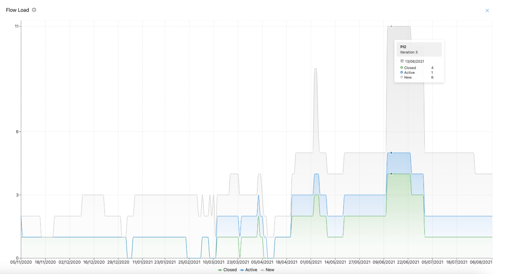
To retrieve data for the Flow Load graph, Nooga Scale queries the WorkItemBoardSnapshot entity. This provides a snapshot of board work item states for each day within the selected timeframe. A separate query is executed for each available project ID from the distinct projects included in the selected ART.
Nooga Scale queries the following:
- Date value between selected ART minimum and max date.
- Has team in list of teams included in the selected ART
- Has an iteration that starts with the selected ARTs PI iteration paths (or team iterations if applicable)
- Has a work item type in the list of selected work item types in the filter in the Scale analytics
- Has states mapped in board columns of Azure DevOps (If a state is missing in your board columns, it will not get included in the data)
All entries with the same dates are grouped together, adding the distinct groups to a property to allow the dataset to be filtered.